

How To: Fill Out Character Sheet on D&D Beyond
Overview
Section titled OverviewThis guide will help you create your character in D&D Beyond within campaigns I run. This covers the general character options to enable, things to look out for, and how to work around any bugs that might pop up.
Steps:
Section titled Steps:Step 0: Make an Account
Section titled Step 0: Make an AccountSimple - make a D&D Beyond account at this link
Step 1: Join The Campaign
Section titled Step 1: Join The CampaignUsing the link I provide you, join the D&D Beyond Campaign to begin creating your character. This will automatically have the campaign specific content enabled so nothing you need to worry about there.
Step 2: Character Options
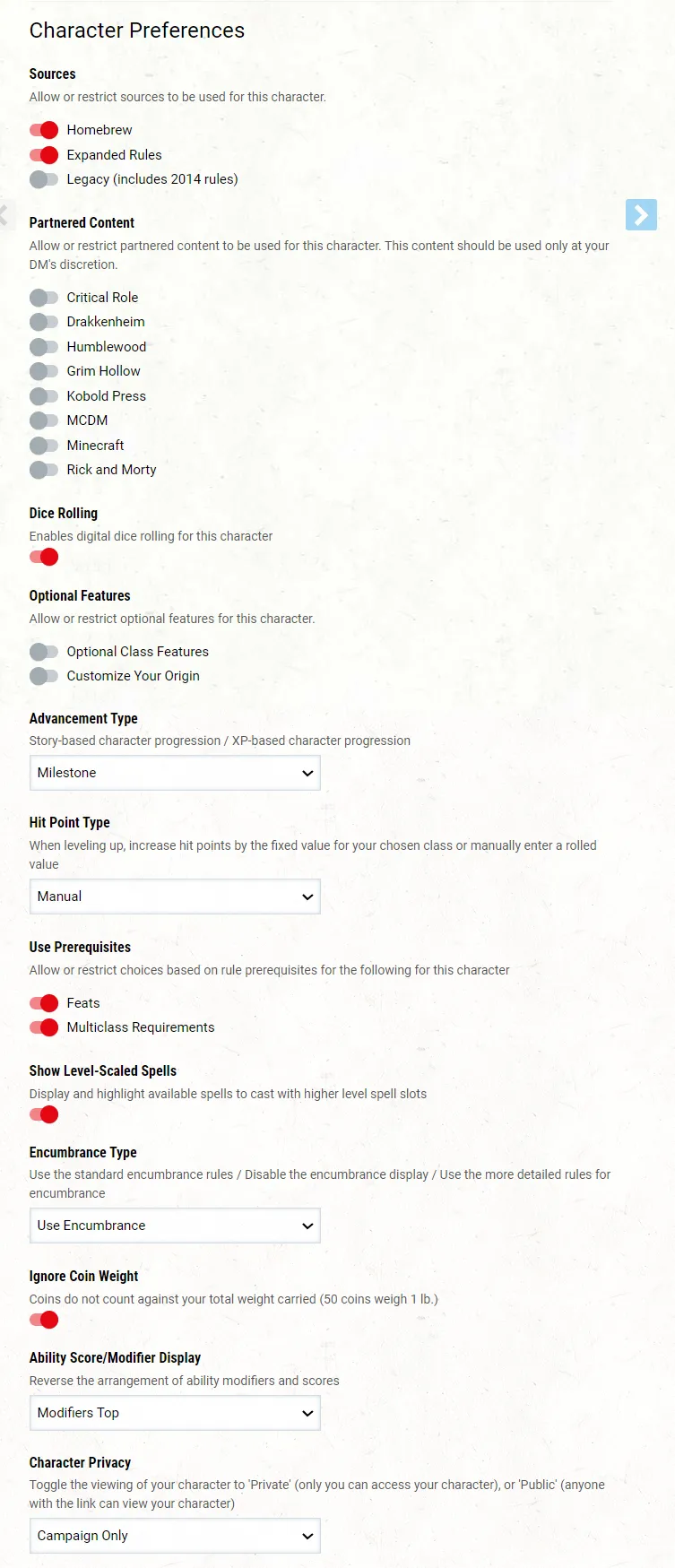
Section titled Step 2: Character OptionsBefore you can get into the specifics of your character - you need to setup your character’s settings correctly. These include what content to enable/disable for your character. Also, on this screen you can name your character.
For visual aid; please align your character settings to the below options.
Legacy Rules
Section titled Legacy RulesIf your character has a good reason to be using 2014 content - i.e. your class no longer exists in 2024 or you’ve got a specific build in mind that I’ve accepted within the boundaries in the campaign - then you can enable the Legacy (includes 2014 rules) Source Flag.
Step 3: Character Details
Section titled Step 3: Character DetailsThis is the character specific stuff you should have already discussed with (for anyone other than brand new players at least.)
Read this chapter of the 2024 Player’s Handbook to get further information on the game mechanics and vibe.